All apps
Coming soon to the App Store For iPhone & iPad Deutsch
Teleprompter app for iPhone and iPad

Prompterly — A teleprompter that listens to you.

You speak, the text follows. Pause, and it waits. Made for explainer videos — with properly typeset formulas.

What it's about

Reading without looking like you're reading

I shoot math and physics explainer videos every week. Most teleprompters scroll stubbornly at one speed — too fast when I point at the board, too slow when I get going. Prompterly listens instead.

Speech recognition runs entirely on the device. Prompterly compares what you say with the script and keeps the current line at the top, close to the camera. Skip a sentence or go back, and the text finds you again.

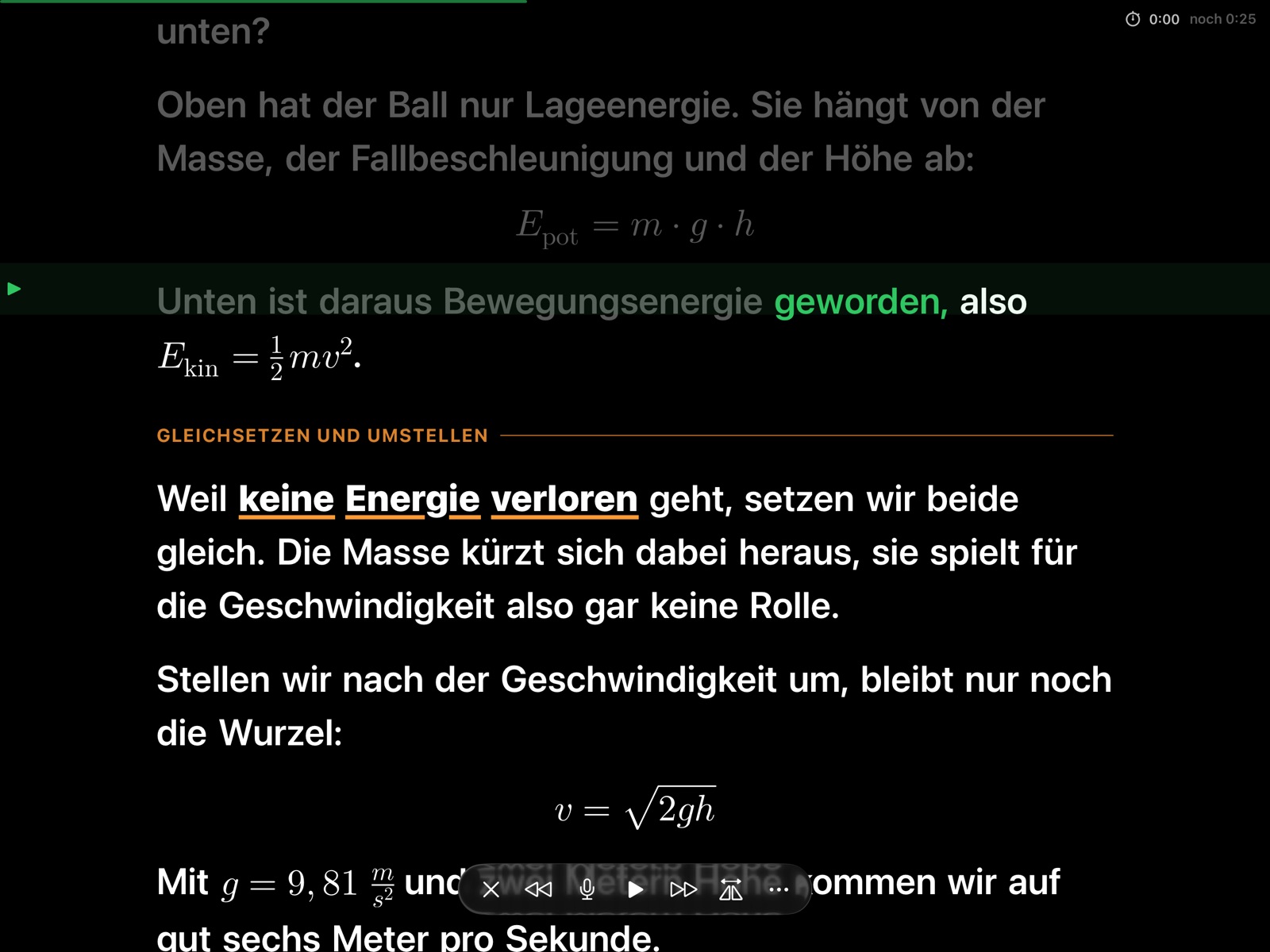
And because my scripts contain formulas, Prompterly typesets them the way they appear on the board — instead of E = 1/2 m v^2 as a jumble of characters.

What makes it different

Made for the real shoot

All images are taken from the app in landscape — the way the prompter usually sits in front of the camera.

Follows your voice

The text moves at your pace.

What you've read turns grey, the current word is highlighted, and a marker lines the reading line up with the camera. Write formulas LaTeX-style between dollar signs — you don't have to read them word for word, the text keeps following.

On-device speech recognitionFormulasReading marker
Follows your voice
Stage directions

What to do is in the text — but not spoken.

Put [pause] or [point at the board] in square brackets. Prompterly shows the direction small and in color and skips it when matching your voice. Three color schemes: white or yellow on black, black on white.

Yellow on blackText widthMirror, vertically too
Stage directions
Your scripts, your storage

Write on your Mac, read on your iPad.

Scripts are plain text files. Keep them on the device, in a folder in iCloud Drive, Google Drive, Dropbox or Synology Drive — or on your own WebDAV server. Import Word, PDF, RTF and Markdown (Obsidian too) with a button or via Share from any app. Every script shows its estimated speaking time, based on your measured pace.

iCloud · WebDAVImport from Word & PDFSpeaking time
Your scripts, your storage
Adjust it on the text

Font, width, reading line, with the script in view.

Set font size, text width, line spacing and reading line right above your script and see the effect instantly. Plus mirror mode for teleprompter glass and a fixed pace with countdown if you'd rather not use your voice.

MirrorReading linePinch to zoom
Adjust it on the text
Also
  • RemoteA second iPhone or iPad controls the prompter, encrypted with a code.
  • KeysBluetooth remotes and keyboards: space starts, arrows jump.
  • FormulasFractions, roots, subscripts, units — inline and on their own line.
  • English & GermanApp and speech recognition in both languages.
  • Chapters & clockHeadings become jump markers for the next take; elapsed and remaining time sit in the corner.
  • Apple WatchStart, stop, sentence, pace and chapters from your wrist.
  • Right on the textPinch to resize; scroll by hand to set where the next take starts.
  • Quick to writePaste text from the clipboard; keys above the keyboard for formulas, chapters and emphasis.
Good to ask

Frequently asked questions

What does Prompterly cost?

Nothing. No in-app purchases, no subscription, no ads, no account.

Does Prompterly listen in on what I say?

Only the device itself. Speech recognition runs entirely on your iPhone or iPad; nothing is recorded, stored or transmitted. Details are in the privacy policy.

Does it work in landscape and with teleprompter glass?

Yes. Prompterly rotates with the device and mirrors the text horizontally and vertically if you like — depending on how your glass is mounted.

How do I write formulas?

LaTeX-style: $E = mc^2$ inline, $$v = \sqrt{2gh}$$ on its own line. The included welcome script shows everything.

Is Prompterly available in German?

Yes. App and speech recognition speak English and German. This page is also available in German.

Good to know

Privacy, price and help

Where your data lives

Scripts live where you put them: on the device, in your cloud folder or on your WebDAV server. No server of mine, no account, no tracking.

Privacy policy

What it costs

Prompterly is free, with no limits. I built the app for my own videos and share it because others in front of a camera have the same problem.

Help

Questions and bug reports are answered on the support page.